Bifrost AI Gateway: Production Deployment Guide
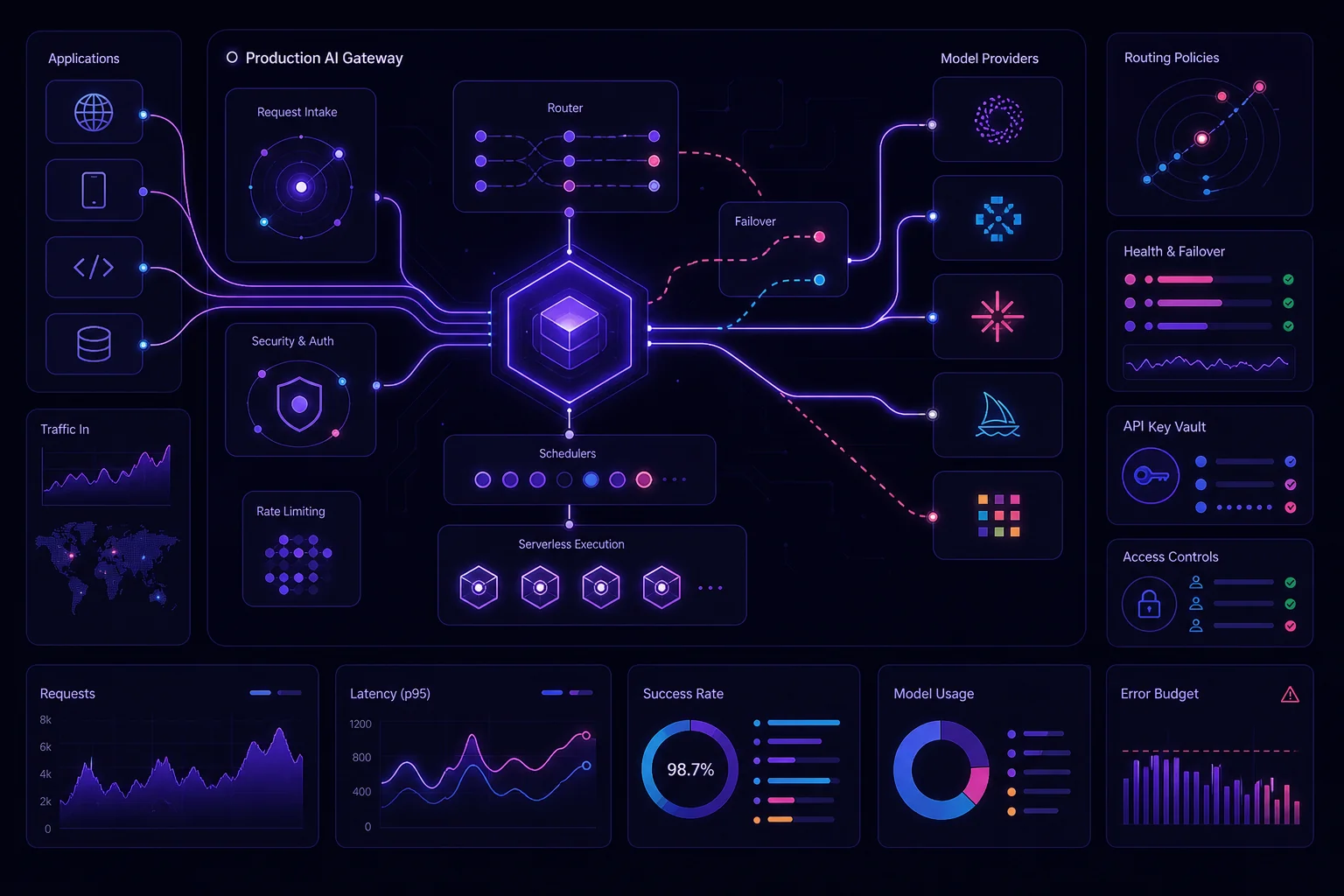
A model gateway removes provider-specific code from your applications. It also becomes shared infrastructure that can interrupt every AI workload when misconfigured. A production Bifrost deployment therefore needs more than a running container. You need isolated administration, protected provider credentials, explicit routing rules, observable failover, and a rollback path. This guide takes Bifrost from a local smoke test to a multi-provider production architecture without treating the gateway as a black box.
1. Design the production architecture before deploying Bifrost
Bifrost sits between your applications and model providers. It exposes an OpenAI-compatible API, so agents can call one gateway instead of integrating separately with every provider.
The Bifrost documentation lists support for more than 20 providers, including OpenAI, Anthropic, AWS Bedrock, Google Vertex, and Azure. The GitHub repository states support for more than 23 providers. Treat that difference as a documentation-version detail. Verify the providers and model features required by your application before deployment.
A practical topology looks like this:
AI agents and applications
            |
       TLS endpoint
            |
   Upstream load balancer
            |
     Bifrost instances
        /         \
Primary provider  Fallback provider
            |
 Prometheus, traces, and logs
Keep the administration path separate from normal inference traffic:
Operators -> protected admin access -> Bifrost configuration
Applications -> public or private API endpoint -> Bifrost routing
The load balancer should send traffic only to ready instances. Provider keys should enter the runtime through a secret store, not an image or repository. Metrics, traces, and deployment metadata should leave through controlled observability integrations.
Before provisioning anything, answer these questions:
- Which applications can access the gateway?
- Which models can each application use?
- Which provider is primary for each workload?
- What constitutes a retryable failure?
- Where is configuration backed up?
- How will you restore a previous image and configuration?
- Can operators reach the administration interface without exposing it to application clients?
This architecture does not eliminate upstream limits. It gives you one place to handle them. For the wider operational constraints around queues, isolation, cost, and orchestration, see this guide to scaling AI agents and identifying infrastructure bottlenecks.
2. Deploy Bifrost locally, in staging, then in production
Start with the shortest supported local path. You can launch Bifrost through npm:
Or run its Docker image:
After startup, open:
The integrated web interface supports visual configuration, real-time monitoring, and analytics. Bifrost also supports dynamic provider configuration through the interface, its API, or files.
Do not move directly from this local process to production. Promote the same intended configuration through distinct environments.
Local
- Confirm that Bifrost starts.
- Add development credentials through a supported secret mechanism.
- Connect a disposable client.
- Verify a basic request through the OpenAI-compatible API.
- Check that request data appears in the expected monitoring view.
Staging
- Use non-production provider credentials.
- Apply the intended routing and virtual-key policies.
- Exercise provider errors and fallback behavior.
- Export metrics and traces.
- Confirm that application logs do not contain secrets.
Production
- Pin an approved container image or immutable digest.
- inject credentials at runtime.
- Restrict the administration interface.
- Add load-balancer readiness checks.
- Keep the previous image and configuration available for rollback.
An OpenAI client can select Bifrost through its base URL rather than calling a provider directly:
import os
from openai import OpenAI

client = OpenAI(
    base_url=os.environ["BIFROST_BASE_URL"],
    api_key=os.environ["BIFROST_VIRTUAL_KEY"],
)

response = client.chat.completions.create(
    model=os.environ["MODEL_NAME"],
    messages=[
        {"role": "user", "content": "Summarize the latest monitoring report."}
    ],
)

print(response.choices[0].message.content)
The environment names above belong to the application example, not to Bifrost’s native configuration. They prevent gateway addresses and consumer credentials from being embedded in code.
3. Manage provider secrets, virtual keys, and tenant access securely
Bifrost supports provider API keys supplied through environment variables and deployment secrets. Use those mechanisms instead of committing credentials to configuration files.
Separate two kinds of credentials:
- Provider credentials let Bifrost call upstream model services.
- Virtual keys govern which consumers can call Bifrost and what they can do.
Bifrost documents virtual keys as its primary governance entity. They can carry consumer-specific permissions, budgets, rate limits, and routing rules. Budget controls can also be organized at virtual-key, team, and customer levels.
Use a repeatable secret workflow:
- Create provider credentials outside the source repository.
- Store them in your deployment platform’s secret manager.
- Allow only the Bifrost runtime to read them.
- Inject them when the process starts.
- Give each application or tenant a separate virtual key.
- Restrict that key to approved models and routes.
- Test redaction in application, gateway, and deployment logs.
- Rotate provider credentials and virtual keys.
- Revoke a compromised credential without rebuilding the image.
Never print the complete process environment during debugging. Do not include tokens in exception messages, traces, build arguments, shell history, or deployment metadata.
Rotation must be tested before an incident. Add the replacement secret, verify it with controlled traffic, move requests to it, and then revoke the old credential. Where multiple keys are configured, Bifrost’s load-balancing support can distribute requests across provider keys.
For additional implementation patterns, read the guide to IAM, secret injection, and runtime isolation for production agents.
4. Configure routing, load balancing, and predictable failover rules
Bifrost can route requests to specific models, providers, and keys. Its documented capabilities include weighted strategies, model filtering, load balancing, and automatic fallback between providers or models.
Write routing policy around workload intent rather than provider names alone:
| Workload | Primary route | Fallback behavior | Consumer restriction |
|---|---|---|---|
| Customer-facing response | Approved premium model | Equivalent approved model | Production application only |
| Scheduled summarization | Cost-controlled model | Secondary provider | Background worker |
| Internal evaluation | Explicit test model | No silent fallback | Evaluation runner |
| Regional workload | Allowed regional endpoint | Approved alternate endpoint | Regional virtual key |
This is a policy model, not Bifrost configuration syntax. Translate it through the supported web interface, API, or configuration files.
Weighted routing is useful when you have several provider keys or providers. Model filtering prevents a consumer from selecting an unapproved model. Virtual-key rules keep one team’s experimental route from becoming the default for another team.
Failover also needs an application-level contract. Classify failures before retrying:
- A timeout, rate limit, or provider outage may be retryable.
- An authentication failure should trigger credential investigation.
- An invalid request should return to the caller.
- A model or feature mismatch should not enter an unbounded retry loop.
Cap attempts according to your workload’s latency budget. Preserve a stable application request ID across attempts. Record every upstream attempt under the same trace. For jobs with side effects, persist completion state before repeating downstream work. These controls reduce duplicate processing and make potential duplicate provider charges visible.
Automatic fallback should not hide a degraded provider forever. Emit a failover event and alert on sustained use of the secondary route.
5. Make the gateway highly available and observable
Run multiple Bifrost instances behind an upstream load balancer when the gateway is a shared dependency. Use readiness checks so a starting or unhealthy instance does not receive application traffic. Deploy changes gradually, then stop the rollout if readiness or synthetic requests fail.
Bifrost’s enterprise documentation describes clustering with automatic service discovery, gossip-based synchronization, and zero-downtime deployments. It also documents private-cloud deployment with VPC isolation. Validate which deployment mode and clustering features are available in your chosen edition before designing around them.
Protect the administration plane independently from the application endpoint. Restrict network access, require authenticated operator access, and terminate TLS at an approved ingress layer. A private administration route reduces the chance that configuration controls become part of the public API surface.
Bifrost provides native Prometheus metrics and OpenTelemetry OTLP integration for distributed tracing. Build a dashboard around:
- Request rate
- Gateway and upstream error rate
- Upstream provider status
- Latency percentiles
- Token usage
- Quota and budget consumption
- Provider cost
- Rate-limit events
- Failover count
- Active deployment version
Do not copy generic alert thresholds. Establish a baseline in staging, then alert on deviations that violate your application’s latency, availability, or budget requirements.
Attach deployment identity to logs, metrics, and traces. You should be able to answer which release served a failed request. The same principle is covered in this guide to tracking deployments and evaluating rollback options.
6. Validate recovery, performance, upgrades, and the production go-live checklist
A fallback that has never been exercised is only configuration. Run a controlled recovery drill:
- Send known test traffic through the primary route.
- Disable or make the primary provider unavailable in the test environment.
- Confirm that Bifrost detects the failure.
- Verify that retries remain bounded.
- Confirm that eligible traffic reaches the secondary provider.
- Inspect traces, gateway logs, and provider billing records.
- Restore the primary provider.
- Confirm that traffic recovers without oscillating between routes.
- Record the result and any manual intervention required.
Repeat the drill after routing changes and upgrades.
Test provider compatibility for every feature your application uses. Do not assume that OpenAI API compatibility means identical provider behavior. Your matrix may need to cover streaming, tool calls, images, audio, embeddings, and structured responses. Only include features relevant to your workloads.
Performance claims also need context. Bifrost’s documentation reports 11 microseconds of overhead per request during a sustained benchmark at 5,000 requests per second. The product page separately claims 20 microseconds of added latency and throughput of 5,000 requests per second. These are published benchmark claims, not capacity guarantees for your environment.
Reproduce your own workload with its real request sizes, streaming behavior, routing rules, plugins, network path, and observability exporters. Record the test conditions beside the results.
Before go-live, confirm:
- The production image is pinned.
- The previous image can be restored.
- Configuration is backed up.
- Provider and virtual-key rotation has been tested.
- Administration access is restricted.
- Routing rules are reviewed by workload owners.
- Failover has been exercised.
- Metrics and traces reach the monitoring backend.
- Alerts identify provider degradation and budget anomalies.
- Provider feature compatibility is documented.
- The rollback owner and procedure are known.
Bifrost also supports custom Go or WASM plugins for additional business logic. Treat plugins as production code. Version, test, observe, and roll them back with the gateway.
Conclusion
Bifrost gives applications one OpenAI-compatible entry point for multiple model providers. Production reliability comes from the system around that endpoint: runtime-injected secrets, scoped virtual keys, explicit routing, bounded retries, observable fallback, replicated instances, and rehearsed rollback.
Start locally with the supported npm or Docker command. Promote the configuration through staging. Then deploy the gateway as shared infrastructure, not as an incidental container. If your agents already run on a managed hosting platform, keep Bifrost focused on provider routing while the platform handles agent builds, schedules, isolation, and lifecycle management.